-
Visitor Pattern(방문자 패턴)STUDY/디자인패턴 2025. 3. 3. 19:31
방문자 패턴이란?
객체 구조를 변경하지 않고, 그 객체들에 대해 새로운 기능을 추가할 수 있게 해주는 행동 디자인 패턴이다. 객체의 구조가 자주 바뀌지 않지만, 객체에 대한 새로운 작업을 자주 추가해야 하는 경우 유용하다.
문제
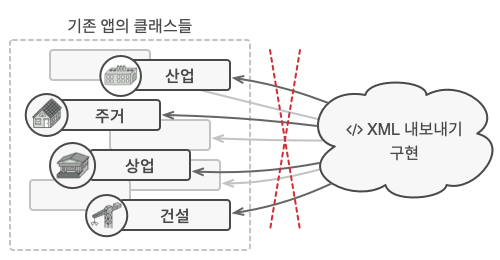
XML 내보내기라는 새로운 기능을 추가할 때, 기존 클래스에 기능을 추가하게 되면 기존 코드에 영향을 많이 주고 복잡성을 증가시킬 수 있다. 또한, 다른 기능이 추가되는 경우 기존 클래스에 변경이 자주 발생하게 되어, 다른 부분에 영향을 줄 수 있게 된다.
해결
방문자 패턴을 사용해 각 객체를 처리하는 별도의 Visitor 클래스를 만들고, 객체들에 대한 작업을 외부에서 수행한다.
- 각 객체들은 accept() 메서드를 통해 Visitor 클래스를 받아들이고, 이를 통해 외부에서 작업을 수행하도록 한다.
- Visitor 클래스는 각 객체들에 대한 작업을 정의한다.
구조
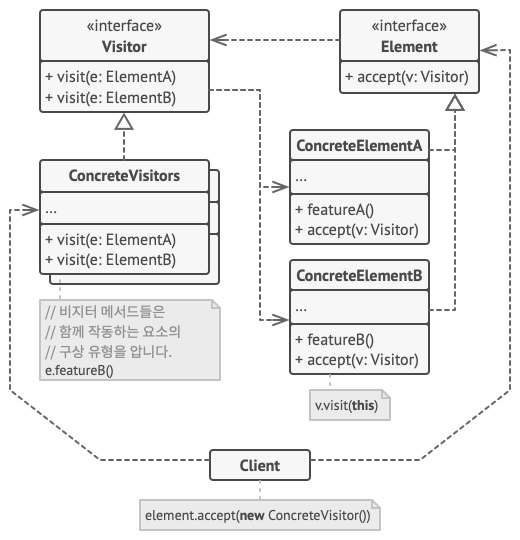
- Visitor
객체 구조의 구상 요소들을 인수들로 사용할 수 있는 비지터 메서드들의 집합을 선언하는 인터페이스로, 이러한 메서드들은 같은 이름을 가질 수 있지만 매개변수 유형은 달라야 한다.
- ConcreteVisitors
구상 비지터 클래스는 다양한 구상 요소 클래스들에 맞춤으로 작성된 같은 행동들의 여러 버전을 구현한다.
- Element
비지터를 '수락'하는 메서드를 선언하는 인터페이스로, 이 메서드에는 비지터 인터페이스 유형으로 선언된 하나의 매개변수가 있어야 한다.
- ConcreteElement
각 구상 요소 클래스는 반드시 수락 메서드를 구현해야 한다. 이 메서드의 목적은 호출을 현재 요소 클래스에 해당하는 적절한 비지터 메서드로 리다이렉트하는 것이다. 기초 요소 클래스가 이 메서드를 구현하더라도 모든 자식 클래스들은 여전히 자신들의 클래스들 내에서 이 메서드를 오버라이드해야 하며 비지터 객체에 적절한 메서드를 호출해야 한다.
- Client
일반적으로 컬렉션 또는 기타 복잡한 객체를 나타낸다. 일반적으로 클라이언트들은 해당 컬렌셔의 객체들과 어떠한 추상 인터페이스를 통해 작업하기 때문에 모든 구상 요소 클래스들을 인식하지 못한다.
예시
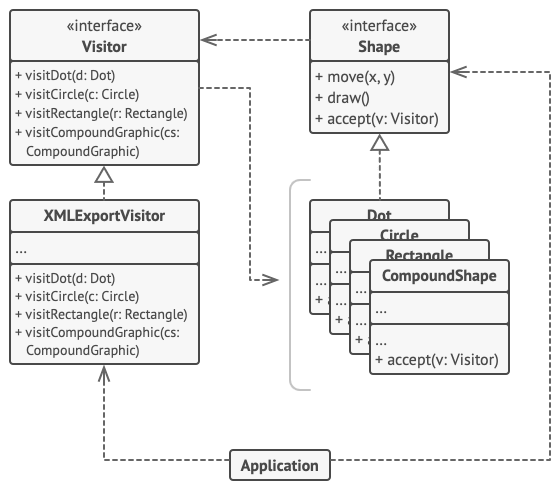
Element
public interface Shape {
    void move(int x, int y);
    void draw();
    String accept(Visitor visitor);
}
ConcreteElement
public class Dot implements Shape {
    private int id;
    private int x;
    private int y;

    public Dot() {
    }

    public Dot(int id, int x, int y) {
        this.id = id;
        this.x = x;
        this.y = y;
    }

    @Override
    public void move(int x, int y) {
        // move shape
    }

    @Override
    public void draw() {
        // draw shape
    }

    @Override
    public String accept(Visitor visitor) {
        return visitor.visitDot(this);
    }

    public int getX() {
        return x;
    }

    public int getY() {
        return y;
    }

    public int getId() {
        return id;
    }
}
public class Circle extends Dot { private int radius; public Circle(int id, int x, int y, int radius) { super(id, x, y); this.radius = radius; } @Override public String accept(Visitor visitor) { return visitor.visitCircle(this); } public int getRadius() { return radius; } }public class Rectangle implements Shape { private int id; private int x; private int y; private int width; private int height; public Rectangle(int id, int x, int y, int width, int height) { this.id = id; this.x = x; this.y = y; this.width = width; this.height = height; } @Override public String accept(Visitor visitor) { return visitor.visitRectangle(this); } @Override public void move(int x, int y) { // move shape } @Override public void draw() { // draw shape } public int getId() { return id; } public int getX() { return x; } public int getY() { return y; } public int getWidth() { return width; } public int getHeight() { return height; } }public class CompoundShape implements Shape { public int id; public List<Shape> children = new ArrayList<>(); public CompoundShape(int id) { this.id = id; } @Override public void move(int x, int y) { // move shape } @Override public void draw() { // draw shape } public int getId() { return id; } @Override public String accept(Visitor visitor) { return visitor.visitCompoundGraphic(this); } public void add(Shape shape) { children.add(shape); } }
Visitorpublic interface Visitor { String visitDot(Dot dot); String visitCircle(Circle circle); String visitRectangle(Rectangle rectangle); String visitCompoundGraphic(CompoundShape cg); }ConcreteVisitor
public class XMLExportVisitor implements Visitor {

    public String export(Shape... args) {
        StringBuilder sb = new StringBuilder();
        sb.append("<?xml version=\"1.0\" encoding=\"utf-8\"?>" + "\n");
        for (Shape shape : args) {
            sb.append(shape.accept(this)).append("\n");
        }
        return sb.toString();
    }

    public String visitDot(Dot d) {
        return "<dot>" + "\n" +
                "    <id>" + d.getId() + "</id>" + "\n" +
                "    <x>" + d.getX() + "</x>" + "\n" +
                "    <y>" + d.getY() + "</y>" + "\n" +
                "</dot>";
    }

    public String visitCircle(Circle c) {
        return "<circle>" + "\n" +
                "    <id>" + c.getId() + "</id>" + "\n" +
                "    <x>" + c.getX() + "</x>" + "\n" +
                "    <y>" + c.getY() + "</y>" + "\n" +
                "    <radius>" + c.getRadius() + "</radius>" + "\n" +
                "</circle>";
    }

    public String visitRectangle(Rectangle r) {
        return "<rectangle>" + "\n" +
                "    <id>" + r.getId() + "</id>" + "\n" +
                "    <x>" + r.getX() + "</x>" + "\n" +
                "    <y>" + r.getY() + "</y>" + "\n" +
                "    <width>" + r.getWidth() + "</width>" + "\n" +
                "    <height>" + r.getHeight() + "</height>" + "\n" +
                "</rectangle>";
    }

    public String visitCompoundGraphic(CompoundShape cg) {
        return "<compound_graphic>" + "\n" +
                "   <id>" + cg.getId() + "</id>" + "\n" +
                _visitCompoundGraphic(cg) +
                "</compound_graphic>";
    }

    private String _visitCompoundGraphic(CompoundShape cg) {
        StringBuilder sb = new StringBuilder();
        for (Shape shape : cg.children) {
            String obj = shape.accept(this);
            // Proper indentation for sub-objects.
            obj = "    " + obj.replace("\n", "\n    ") + "\n";
            sb.append(obj);
        }
        return sb.toString();
    }

}
Client
public class Demo {
    public static void main(String[] args) {
        Dot dot = new Dot(1, 10, 55);
        Circle circle = new Circle(2, 23, 15, 10);
        Rectangle rectangle = new Rectangle(3, 10, 17, 20, 30);

        CompoundShape compoundShape = new CompoundShape(4);
        compoundShape.add(dot);
        compoundShape.add(circle);
        compoundShape.add(rectangle);

        CompoundShape c = new CompoundShape(5);
        c.add(dot);
        compoundShape.add(c);

        export(circle, compoundShape);
    }

    private static void export(Shape... shapes) {
        XMLExportVisitor exportVisitor = new XMLExportVisitor();
        System.out.println(exportVisitor.export(shapes));
    }
}
적용
- 복잡한 객체 구조(ex, 객체 트리)의 모든 요소에 대해 작업을 수행해야 하는 경우
- 행동이 클래스 계층구소의 일부 클래스들에서만 의미가 있고 다른 클래스들에서는 의미가 없는 경우
장단점
장점
- 개방/폐쇄 원칙. 다른 클래스를 변경하지 않으면서 해당 클래스의 객체와 작동할 수 있는 새로운 행동을 도입할 수 있다.
- 단일 책임 원칙. 같은 행동의 여러 버전을 같은 클래스로 이동할 수 있다.
- 다양한 객체들과 작업하면서 유용한 정보를 축적할 수 있다.
단점
- 클래스가 요소 계층구조에 추가되거나 제거될 때마다 모든 비지터를 업데이트해야 한다.
- 비지터들은 함께 작업해야 하는 요소들의 비공개 필드 및 메서드에 접근하기 위해 필요한 권한이 부족할 수 있다.
'STUDY > 디자인패턴' 카테고리의 다른 글
Template Method Pattern(템플릿 메서드 패턴) (0) 2025.03.03 Strategy Pattern(전략 패턴) (0) 2025.03.03 State Pattern(상태 패턴) (0) 2025.02.16 Observer Pattern(옵저버 패턴) (0) 2025.02.16 Memento Pattern(메멘토 패턴) (0) 2025.02.16